United Rentals Total Control®: More control. Less effort.
United Rentals’ flagship fleet and worksite management platform gives you the visibility, insights and control to reduce costs, boost productivity and increase jobsite efficiencies.

Why Total Control?
Total Control provides the real-time equipment information you need to streamline your operations. With our most recent version, it’s faster and easier than ever before, helping you achieve greater jobsite uptime.
Full Fleet Visibility
See every piece of equipment on rent, across every jobsite

Actionable Insights
Turn your data into actionable insights with productivity analytics and sustainability analytics. Learn how we drive worksite innovation.

Cost Control
Identify underused assets, avoid unnecessary rentals and streamline billing.

Customizable Approach
Tailor dashboards, reports and alerts for your unique fleet and jobsite needs.

What Total Control Can Do for Your Business
With access to important data at your fingertips, Total Control helps you make better, more informed decisions about your fleet and projects. Save time and budget dollars while prioritizing your company’s productivity and sustainability goals. Click on the tiles below and view videos on each Total Control capability to learn more.

Fleet Management
Manage, measure and maintain your rental fleet to streamline your operations and save essential time.
► Watch the Video

Customizable Dashboard
See your equipment, billing, and utilization in one customizable view, so you can spot what needs attention and take action.
► View the Dashboard
Invoices and Billing
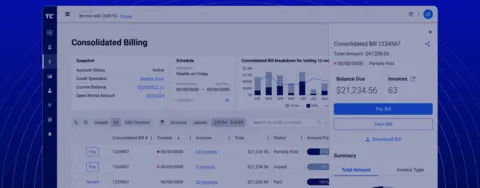
Streamline your finance operations with quick bill payment and the ability to request statements and view payment history.
► Watch the Video

Service Request
Submit a service request for your equipment right on the platform, upload images, and get notified when service is complete.
► Watch the Video

Advanced Telematics
Gain greater visibility into metrics like equipment runtime, utilization and location, and set up important fuel and equipment health alerts.
► Watch the Video

Reports
Create on-demand or scheduled reports to review historical data, track trends and share performance insights with your team or leadership.
► Watch the Video

Notifications
Stay informed with email and SMS alerts for upcoming rental or invoice deadlines, delivery status and equipment utilization and telematics.
► Watch the Video

Lien Releases
Manage lien release requests and keep up with deadlines using Total Control. Email multiple releases at once for time savings.
► Watch the Video

Emissions Tracking
Track your environmental impact by utilizing our emissions dashboard for efficient carbon accounting.
► Watch the Video

Utilization Management
Track equipment utilization and benchmark your performance against industry peers.
► Watch the Video
Tools That Work the Way You Do
For Superintendents
Fleet Management
Real-time equipment location mapping, delivery/pickup tracking, on-demand pickup requests and utilization tracking to keep projects moving.
For Project Managers
Fleet and Billing Management
Full visibility into equipment status and jobsite allocation, invoice viewing and payment, lien release management, purchase order tracking and consolidated billing.
For Management
Insights and Reporting
Benchmark performance across projects, track sustainability metrics, customize dashboards for executive reporting and schedule reports for decision-making. Discover how our digital tools fit into the broader United Rentals innovation road map.
Project spotlight
One-Stop-Shop Experience Transforms County Fair Operations

Summary
In 2024, a major US county fair (750k visitors) partnered with United Rentals for all equipment. This single-vendor solution, leveraging proactive planning and Total Control®, streamlined operations, boosting efficiency and ensuring smooth fair execution.
Challenge
Managing multiple equipment vendors resulted in time-consuming bidding processes, as well as delays and closures when equipment broke down, due to difficulty identifying the responsible vendor.
Impact
United Rentals' single-vendor solution streamlined fair operations, eliminating multi-vendor issues, improving equipment response, and ensuring smoother events with less administration.
Articles
Explore how Total Control has helped customers optimize safety, productivity and sustainability across their jobsites.

Worksite Performance Solutions helps customers optimize safety, productivity and sustainability

Digital Tools Boost Jobsite Security and Safety

Break Down Data Silos with an Open Fleet Management Platform
Total Control FAQs
Answers to common questions about using Total Control, adding users, making payments and getting started. Learn more about the Total Control online ordering experience. Join the community.
For our Total Control users, we provide a dedicated customer support team to ensure direct and comprehensive assistance. If you are a Total Control user, reach out to our team at 844.474.8520 or [email protected] for questions or concerns.
Users with Admin permissions can add and manage users. Navigate to the Users page under Admin and click the blue “Add new user” button. Follow the on-screen steps to provide an email address, name, cell phone number and account number(s) for the new user.
Navigate to the Invoices page under Billing. The default view will be Unpaid invoices. Select the invoice you wish to pay or check the boxes to the left to select multiple invoices. When the side panel slides out for a single invoice, click “Pay Invoice.” If you have selected multiple invoices, you will see a blue button for “Pay & Manage.” Click that to access the side panel. Select your payment method or create a new one; then click Submit Payment.
Open the United Rentals mobile app or Total Control and enter your email address. If you already have a digital profile, you will be prompted to create or reset your password and link your existing rental account to Total Control. You can also email us at [email protected] with your full name, phone number, email address and account number(s). Our team will then set everything up and send each user an email with a link to create their own password.

Join the Community
Explore commonly asked questions and see how other professionals use Total Control to optimize their worksites in our community of users. Our community includes a forum where our customers can share their personal best practices, ask questions and learn from others.
